
QR Code Image Generator20.03 - Download
You'll be able to download in few seconds.
Publisher Description
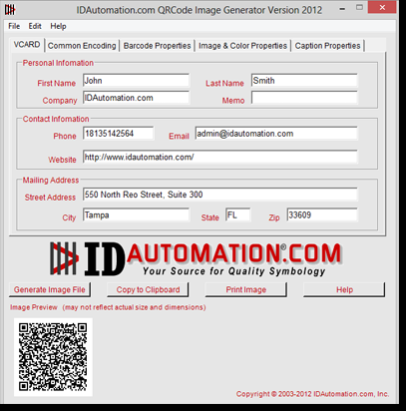
The QR Code Barcode Image Generator for Windows creates images via command prompt or an easy-to-use interface for all QR Code variants 32 and 64-bit Windows environments. Barcode images can be copied and pasted into other applications, or saved as image files in formats for JPEG, TIFF, PNG, BMP, GIF and WMF. Additional features include:
-Supports all QR Code variants in addition to linear and other 2D barcode types.
-Supports Swiss QR-Bill, Image Overlay (as Center Override) and GS1-QR Code encoding.
-Time-saving memorization feature retains all properties and settings of the previous image.
-Generate barcodes with the GUI, from command prompt batch file, or from command line or text file.
-Source code available in VB.NET with Site or Multi-Site License options.
-Bearer bar, white bar increase and character grouping.
-Human-readable text above barcode, and caption support.
The QR Code Barcode Image Generator for Windows is available in a variety of license options to suit your usage scenario. There are a range of options for single or multi-users as well as coverage for all users at a single site, Multi-Site licenses for users and distribution across multiple sites and locations. This product is also availalbe in several other versions for support in OSX environments or Windows support for GS1 DataBar, linear and 2D.
About QR Code Image Generator
This Inventory & Barcoding program is available in English. It was last updated on 29 September, 2026. QR Code Image Generator is compatible with the following operating systems: Windows.
The company that develops QR Code Image Generator is IDAutomation.com, Inc.. The latest version released by its developer is 20.03.
The download we have available for QR Code Image Generator has a file size of 1.0 MB. Just click the green Download button above to start the downloading process. The program is listed on our website since 2020-03-31 and was downloaded 0 times. We have already checked if the download link is safe, however for your own protection we recommend that you scan the downloaded software with your antivirus. Your antivirus may detect the QR Code Image Generator as malware if the download link is broken.
How to install QR Code Image Generator on your Windows device:
- Click on the Download button on our website. This will start the download from the website of the developer.
- Once the QR Code Image Generator is downloaded click on it to start the setup process (assuming you are on a desktop computer).
- When the installation is finished you should be able to see and run the program.
Program Details
System requirements
Download information
Pricing
Version History
version 20.03
posted on 2020-03-31
Added Center Override capability and GS1 & FNC1 encoding to QR Code.
Disclaimer
External Download
We do not host QR Code Image Generator on our servers. We did not scan it for viruses, adware, spyware or other type of malware. This app is hosted by the software publisher and passed their terms and conditions to be listed there. We recommend caution when installing it.
The external download link for QR Code Image Generator is provided to you by apps112.com without any warranties, representations or guarantees of any kind, so access it at your own risk.
If you have questions regarding this particular app contact the publisher directly. For questions about the functionalities of apps112.com contact us.
